

Why a content hub is more than just a new tool
When we talk about content management today, we often think of storage locations, access rights or cloud structures. But digital content is no longer just “data” – it is part of strategic communication, influences processes and shapes the external perception of a company.
Especially in fast-growing or distributed organizations, conventional systems such as file folders or SharePoint quickly reach their limits. Information is duplicated, outdated or simply cannot be found.
An intelligent content hub provides a remedy here – not through mere centralization, but through a new way of thinking: Not just storing content, but intelligently managing, linking and providing it. However, this transformation requires well thought-out change management.
But how can such a system be successfully implemented – and what does it take to ensure that the hub really works in everyday life?
What makes a content hub intelligent?
Before we move on to implementation, it is worth taking a brief look at the “why”:
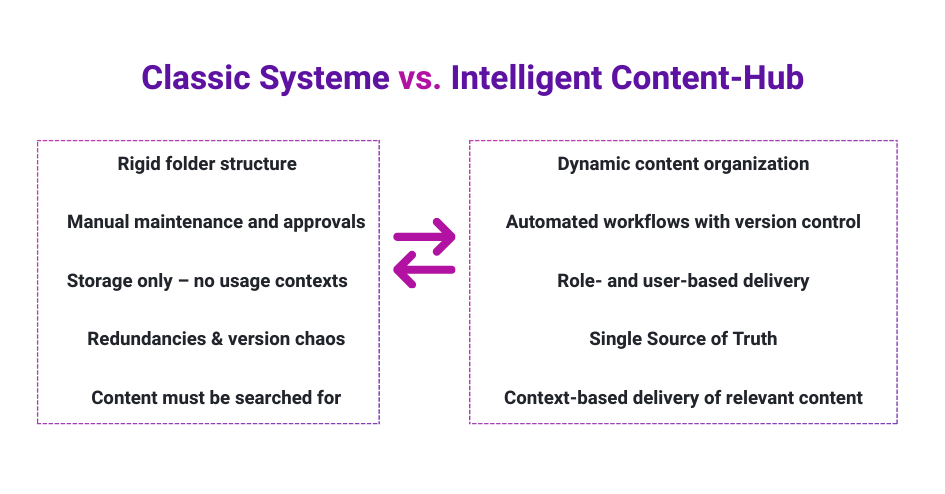
An intelligent content hub differs from traditional storage systems in three main ways:
- Contextual organization instead of a rigid folder structure
Content is not only stored, but also provided with metadata, categorized according to purpose and linked to each other. - Automation of processes
Approvals, versioning or updates are not carried out manually, but on the basis of predefined rules – tailored to roles, workflows and rights. - User-centered provision
Employees only see the content that is relevant and up-to-date for them – depending on their role, department, region or language.
Such a hub thinks in terms of usage scenarios, not file formats – and thus becomes a central component of digital collaboration. Find out more in this article about efficient collaboration when creating presentations
Implementation: not an IT project, but a change process
Many companies underestimate what the introduction of a content hub means. It is not primarily about technology – but about structural change. Content must be rethought, processes redefined and habits adapted. Successful change management is therefore crucial right from the start.
It is therefore helpful to divide the introduction into five phases – not as a rigid model, but as an orientation for realistic, sustainable implementation.
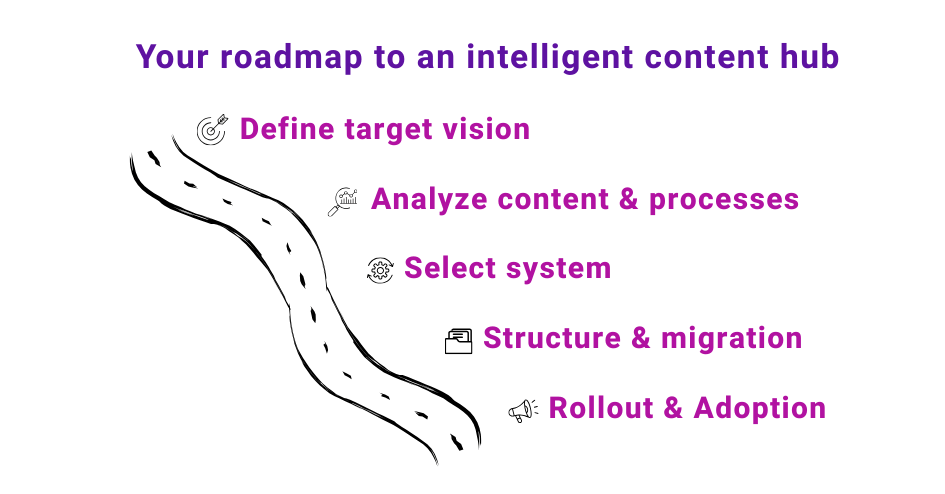
1. define the target image: What should the hub achieve?
Every company has different challenges when dealing with content. While a consulting company focuses on consistent customer presentations, a manufacturer is more concerned with product specifications, safety data sheets or technical updates.
Before you talk about functions, you should answer the following questions:
- What content should be managed in the hub?
- Which target groups in the company use the hub?
- Which challenges should be solved – Search? Update? Release?
- What does successful use look like in six months?
A clearly formulated target image not only facilitates system selection, but also later communication within the team.
2. analyze existing content and processes
The second biggest source of error when introducing a hub is simply importing all existing content – unfiltered. But an intelligent content hub thrives on relevance and structure.
So take the time for a systematic content audit:
- What content is currently available – and where?
- Which of them are outdated, duplicated or not maintained?
- Who is responsible for which documents?
- Which tools are currently used to create content – and which of them should be connected?
Such an audit is often laborious, but crucial: it forms the foundation for a clean, scalable hub structure.
3. select system – with a view to everyday life and the future
The market for content hub solutions is large – from lean SaaS solutions to powerful enterprise tools. The “best” solution is not the one with the most functions, but the one that can be integrated into your existing daily work routine.
When making your selection, pay particular attention to:
- User-friendliness: Is the tool understood and accepted by non-technicians?
- Integration: Can the hub be connected to existing systems such as CRM, DAM or collaboration platforms? Does it fit in with your processes, challenges and objectives?
- Rights and role concepts: Can individual workflows and access models be mapped?
- Automation options: Does the system support approvals, versioning, reminders, etc.?
Tip: Involve pilot users from different departments at this stage – they will quickly recognize whether the hub works in everyday life.
4. build structure and migrate content – with a system
Now it’s time to get specific: Together with the responsible stakeholders, an initial content structure is created – thematic, process-oriented or role-based, depending on the organization.
The migration then begins: content is consolidated, updated, renamed or rekeyworded if necessary. The following applies:
- Less is more: only upload what is relevant, correct and useful.
- Every piece of content needs an owner.
- Metadata is not optional, but mandatory – it enables subsequent filters, search functions and automation.
The process should be accompanied by a test run with a defined group of users – this allows stumbling blocks to be identified at an early stage.
5. rollout and change management – ensure adoption
The introduction of a content hub is not complete with the go-live. Now is the time to decide whether the system will be used – or whether it will degenerate into the “next platform that nobody opens”.
That’s why communication and training are just as important as technology. Successful rollouts rely on:
- Practical training courses instead of pure product demos
- Onboarding guides for different roles
- Feedback channels and support services
- “Content champions” in specialist departments as multipliers
- Application examples (“use cases”) that make the benefits tangible
And very importantly: the content hub remains dynamic. New content, processes or departments are constantly being added – the hub must be allowed to grow.
Success factors for sustainable use
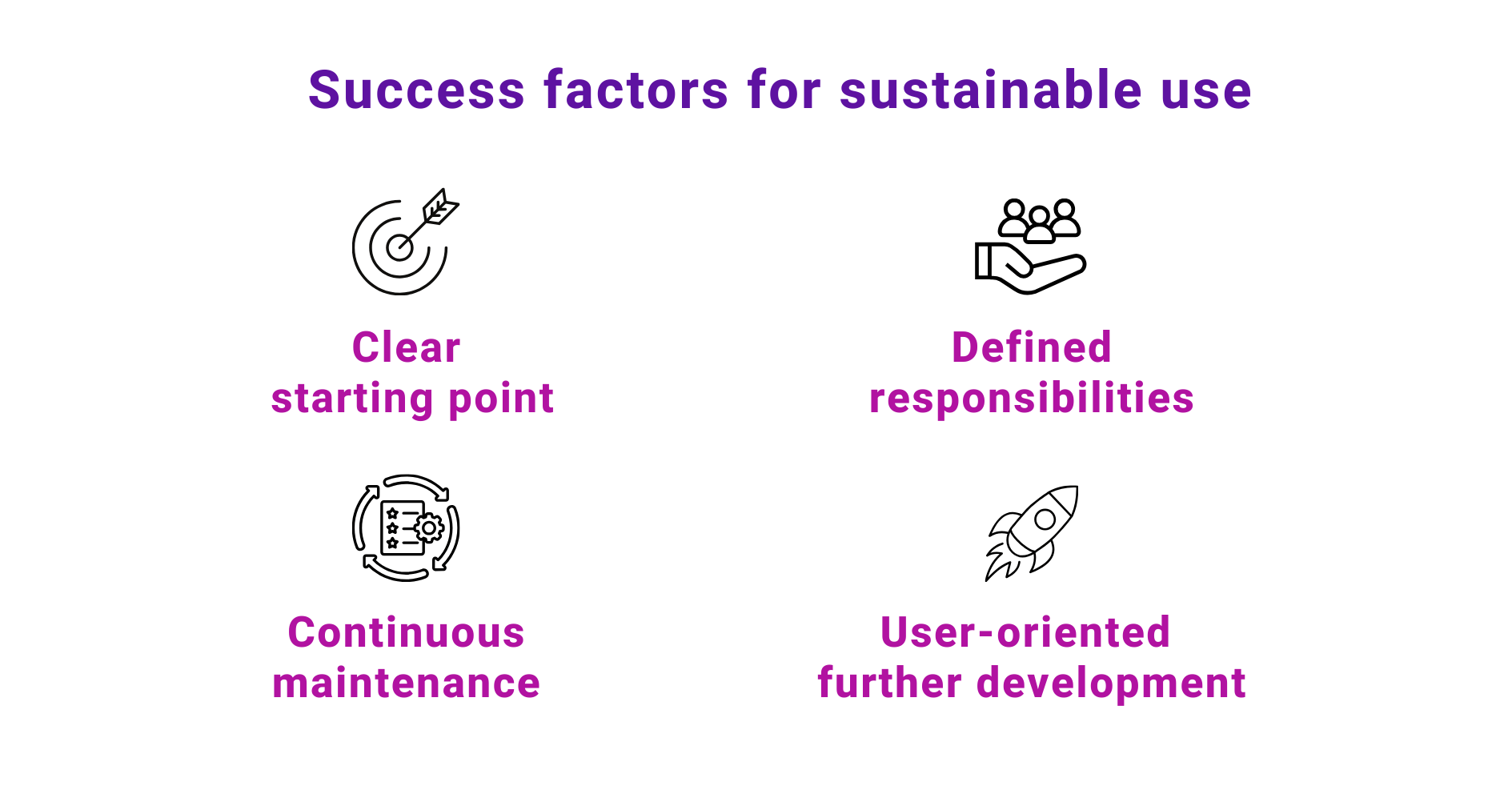
An intelligent content hub can only fully develop its added value if it is used and maintained on a permanent basis. A clearly defined starting point is crucial for this – ideally with a specific use case, such as presentation management. Presentations in particular are perfect as a starting point, as they are required in almost all departments, need to be updated frequently and make the challenges of a content hub (version conflicts, outdated content, lack of corporate identity) particularly clear. This makes it possible to quickly demonstrate the benefits and strengthen acceptance within the team.
It is equally important to define responsibilities: Who is responsible for which content? Who maintains, updates or archives? A well-functioning hub does not need perfection, but clear responsibilities, continuous attention and accompanying change management for sustainable changes in behavior.
In the long term, the content hub should be seen as a dynamic platform. Content must not only be provided, but also regularly reviewed and further developed – based on real user needs. This is the only way to turn a tool into a central component of efficient collaboration.
Conclusion: An intelligent content hub is not software – but a strategic lever
The implementation of a content hub is much more than a technical rollout. It is a strategic step towards greater clarity, efficiency and professionalism in dealing with company content.
When implemented correctly, the hub becomes the connecting element between departments, locations and target groups – and thus the heart of modern communication.
Organizing content creates orientation. Those who organize it intelligently create added value.